Product feature update: You now control whether BondScanner calls you

Not everyone wants the same type of communication
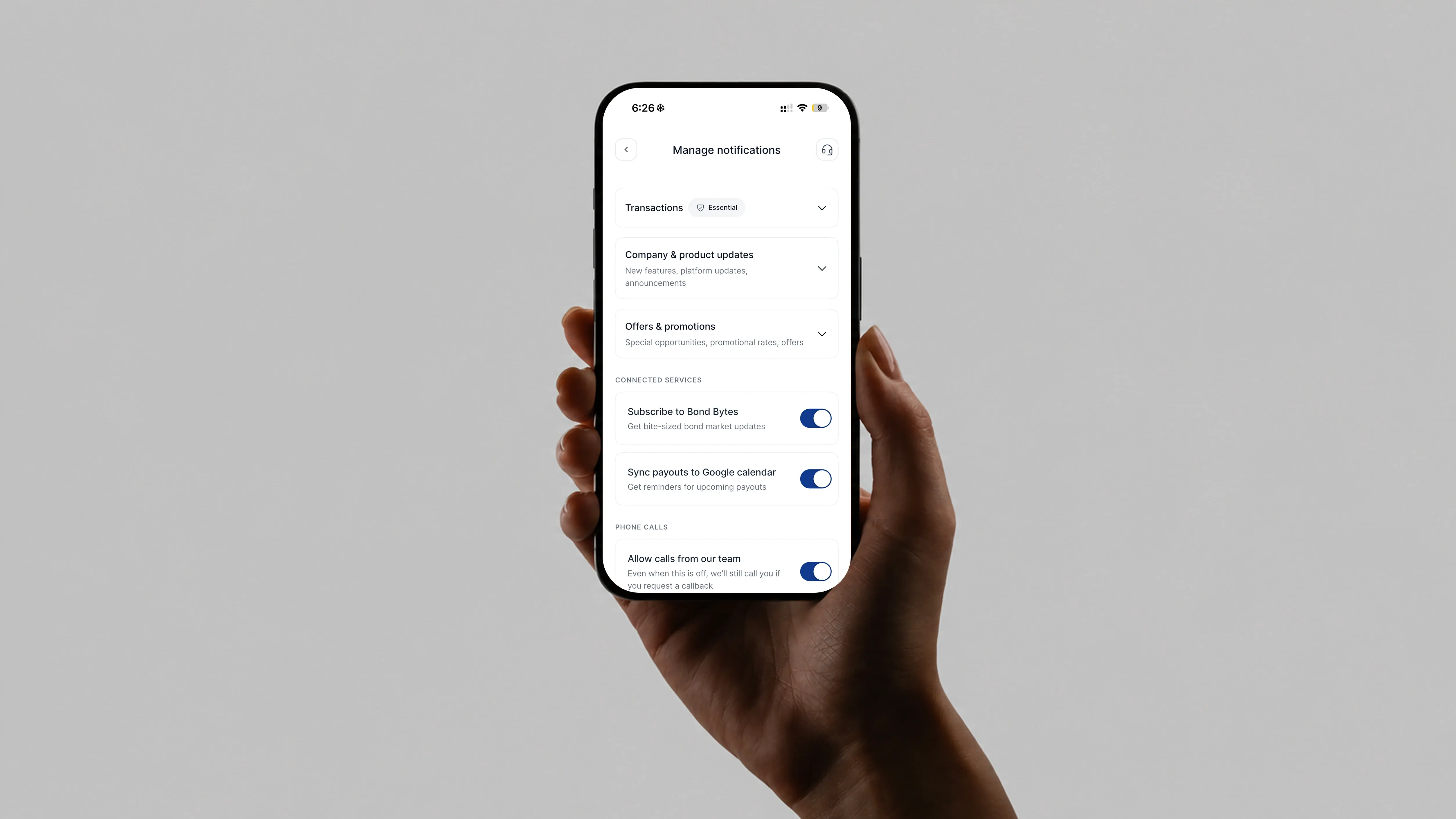
Some investors like a quick call when there is an update or a payment coming up. Others would rather not receive calls at all, and prefer to reach out only when they actually need help. Up until now, BondScanner did not have a way to let you set that preference.
One of our users asked: "I don't always want a call, but I'd still like to reach out when I actually need help. Can I control that?" That question led directly to this update.
Call preferences is now live
You can now choose whether you receive service calls from BondScanner. If you prefer not to be called, you can turn off service calls from your Notification Preferences. If you are happy to receive them, nothing changes.
You can update this setting at any time.
What changes when you turn calls off
If you choose to turn off service calls, here is what stops:
Payment reminders that come via call
Other service-related calls from the BondScanner team
Turning off calls does not affect any other communication from BondScanner. You can also turn calls back on at any time from the same settings screen.
Callbacks still work when you need them
Turning off service calls does not mean you lose access to support. Whenever you need help, you can still request a callback from the BondScanner team and they will get in touch with you.
You do not have to choose between not receiving calls and being able to reach support. Both are possible at the same time.
A redesigned notification preferences screen
Alongside the new call preferences, the Notification Preferences screen has also been redesigned. It is now easier to find settings, understand what each option does, and make changes quickly.
If you have not visited Notification Preferences in a while, the updated layout should feel more straightforward to navigate.
Where to find it
Call preferences and all other notification settings are under Profile → Notification Preferences. The new setting is available now.
Recent Blogs

Buying bonds? These 5 mistakes could be quietly increasing your risk
A practical retail guide to navigating corporate debt highlighting why chasing headline yields, ignoring concentration risk, and overlooking secondary market illiquidity can undermine your portfolio.

Nishchay Nath
06 Oct 2026

Comparisons
Edelweiss vs Muthoot Fincorp NCDs: Which high-yield issue wins?
Missed the Muthoot Fincorp NCD? A side-by-side comparative guide to locking in up to 10.00% per annum with Edelweiss Financial Services—breaking down CRISIL ratings, risk-reward tradeoffs, and portfolio allocation rules.

Atharva Joshi
06 Oct 2026

Founder's Notes
India’s bond market does not need more education, it needs better products
Why closing the ₹214 lakh crore gap between bank deposits and corporate bonds requires simpler product architecture, tokenized fractionalization, and seamless wallet-driven investing rather than endless investor education.
Nishchay Nath
30 Sep 2026

Issuer Spotlights
Understanding SMC global securities bonds: returns, credit rating & risk factors
A comprehensive investor guide to SMC Global Securities Limited NCDs, breaking down diversified financial services, annual cash flows, CRISIL A credit ratings, secondary market yields, and risk parameters.

Subham Mishra
28 Sep 2026