Deal details revamped on BondScanner
Reading bond details shouldn't feel like work
Before you invest in a bond, you want to understand it. What is the yield? Who is the issuer? Is there a credit rating? What is the security cover? These are basic questions, and the answers were always there on BondScanner. But finding them required a lot of scrolling, jumping between sections, and piecing together information spread across the page.
That experience did not match what bond investing should feel like. So we changed it.
What has changed in deal details
The Deal Details page has been fully restructured. Key bond information is now organised into four clear sections, each with a specific purpose. You can find what you are looking for without scrolling through everything, and every number and label is presented with enough context to be useful.
Key Highlights - the most important numbers about a bond, visible at the top
Security Cover - details on how the bond is structured and what backs the investment
About the Company - information about the issuer, their leadership and their registered location
Other Disclosures - ISIN details, credit rating, coupon details, term sheet and rating report, all in one place
Everything you need is now presented in a simple, easy-to-navigate format.
Key highlights: The numbers that matter, right at the top
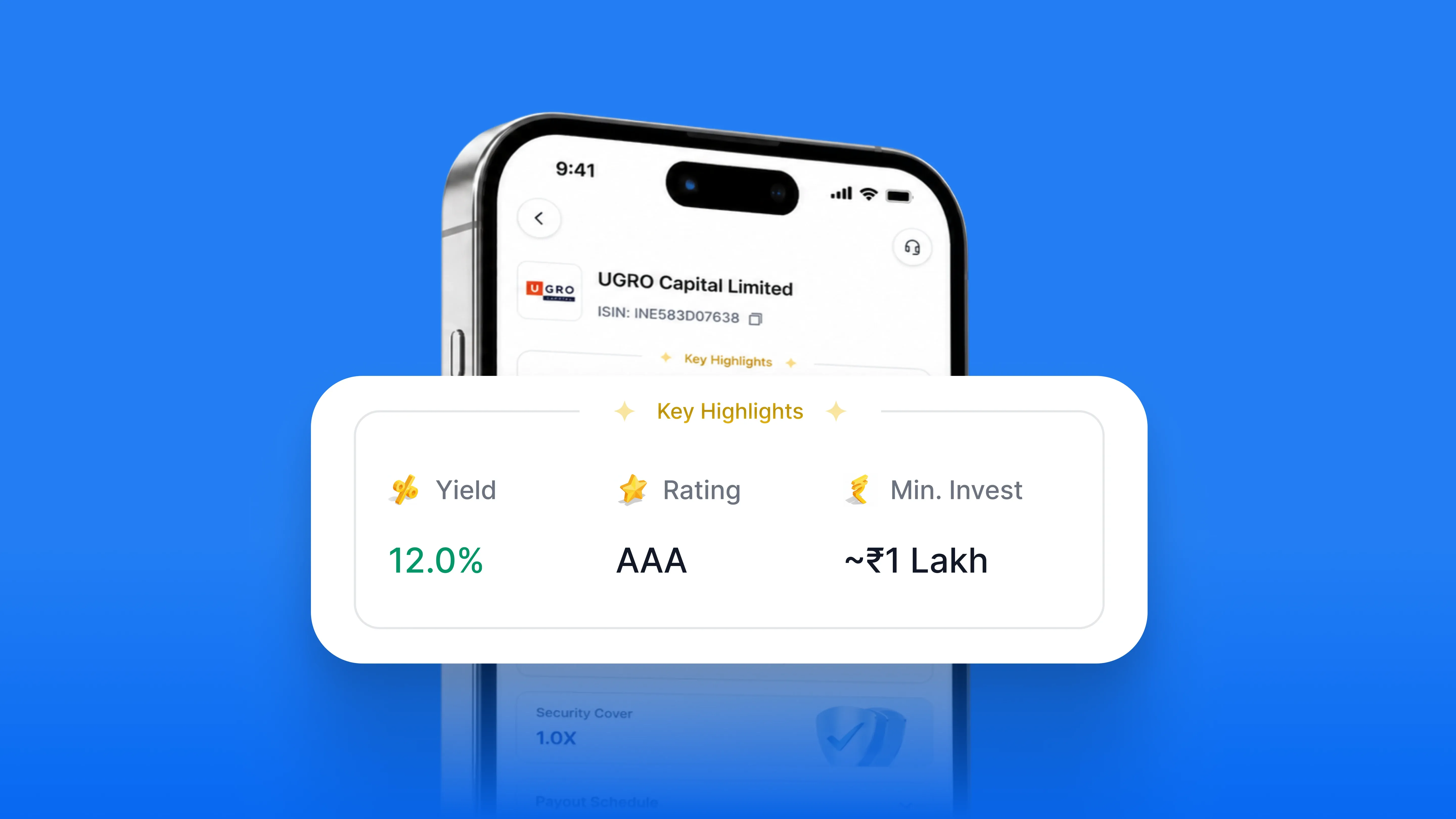
The Key Highlights section surfaces the three data points most investors look at first: Yield, Credit Rating, and Minimum Investment Amount. These sit at the very top of the page, alongside the bond's ISIN and a tag showing whether the issuing company is publicly listed.
Below that, the section shows interest type, principal repayment structure, maturity date, and seniority. Seniority refers to where a bondholder stands in the repayment order if the issuer faces financial difficulty. Senior bonds are repaid before subordinated or junior bonds, which makes this a meaningful data point when evaluating risk.Having these details together in one place means you spend less time looking and more time evaluating.
Security cover: Understanding how an investment is structured
Security cover is a ratio that tells you how much the issuer's assets back the bond relative to its outstanding value. A security cover of 1.0x means the assets pledged as collateral are equal to the value of the bond. A cover above 1.0x means the collateral exceeds the bond value, which provides a buffer for investors in case of default.
This section also shows the seniority of the bond and the type of principal repayment, whether it is a full redemption at maturity or returned in parts over the tenure.
Understanding security cover is part of evaluating the risk profile of a bond. SEBI regulations require issuers to disclose security cover as part of their bond offer documents, and BondScanner now surfaces this information directly in the app so you do not have to look for it separately.
About the company: Know who you are investing with
When you invest in a bond, you are lending money to the company that issued it. The About the Company section gives you a quick overview of who that is: what they do, how they are structured, and who leads the organisation.
You can visit the company's official website directly from this section, and see their registered office location on a map. Key management personnel are listed with their designations and LinkedIn profiles where available.
Knowing the issuer matters. SEBI mandates that bond issuers disclose material information about the company as part of the offer document process. The About the Company section brings that disclosure into a format that is easy to read inside the app.
Other disclosures: All documents in one place
The Other Disclosures section brings together every document and detail that an investor might want to look at before investing in a bond:
ISIN Details - the unique identifier assigned to each bond series, used across exchanges for tracking and settlement
Credit Rating - the rating assigned by a registered credit rating agency such as CRISIL or ICRA, along with the rationale behind the rating
Coupon Details - the interest rate, payment frequency, and day count convention used to calculate payouts
Term Sheet - a downloadable summary of all the key terms of the bond, as filed with the exchange
Rating Report - the full credit rating report from the rating agency, downloadable directly from the app
These documents are part of the mandatory disclosures that issuers file with stock exchanges under SEBI's debt listing regulations. Having them available inside the app means you do not need to search on BSE or NSE India separately before making an investment decision.
Built from what you told us
This update came from a very specific piece of feedback.
"I always had to scroll so much just to find basic details about a company. Can you make it simpler?"
Arjun, BondScanner user
That is exactly what this redesign addresses. The layout, the section order, the grouping of information all of it was thought through with that feedback in mind.
Please ensure your app is updated to the latest version to see the new Deal Details page. If you have feedback on this update or anything else on BondScanner, write to us at support@bondscanner.com.
Recent Blogs


Issuer Spotlights
Nirmal Bang Securities Bonds: NCD Structure, Rating & Risks
An in-depth investor guide to Nirmal Bang Securities Private Limited NCDs, breaking down brokerage operations, 10.25% per annum quarterly payouts, CRISIL A- credit ratings, secondary market yields, and risk parameters.

Atharva Joshi
15 Oct 2026