Product feature update: Get your investment reports instantly on email
Getting your investment reports
For anyone with bond investments, periodic reports are an important part of staying on top of your portfolio. Whether you need a P&L statement for tax planning, a capital gains summary at the end of the financial year, or a holdings snapshot to review where you stand, having easy access to these documents matters.
Until now, getting these reports on BondScanner required contacting support or waiting for assistance. Many users told us this felt slower than it should. One user put it directly: "I needed my P&L report quickly and had no idea how to get it. Can you make this easier?"
That feedback shaped this update.
Reports on email: what's new
You can now request any of your investment reports directly from the BondScanner app. Once requested, the report is delivered instantly to your registered email address. No support ticket needed, no waiting.
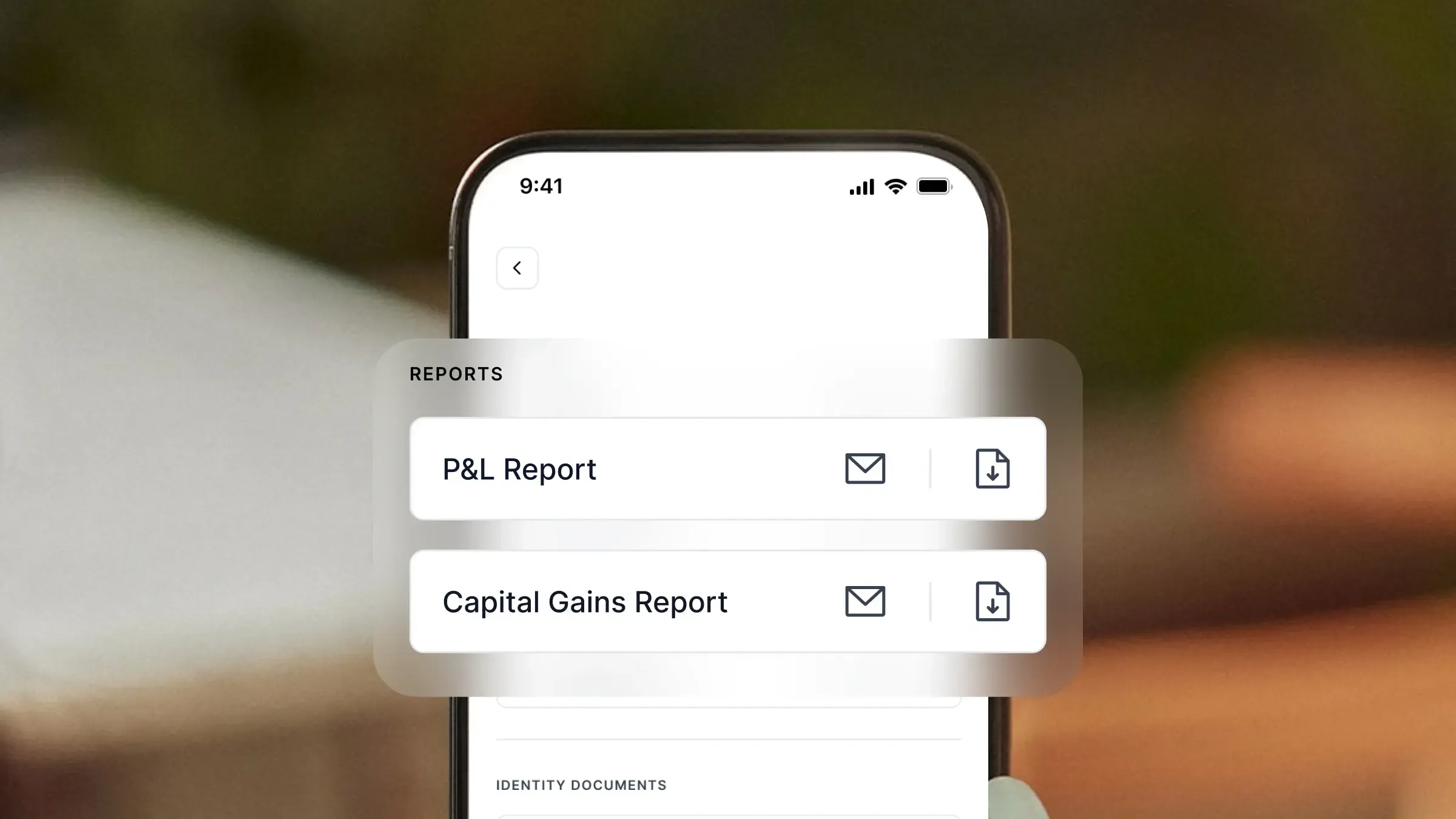
The reports section is available within the app under Profile, then Account Details, then Reports and Downloads. Each report type has a mail icon next to it. Tapping that icon triggers the delivery to your inbox.
You can also download reports directly from within the app if you prefer to access them on your device rather than by email.
Which reports are available
Four types of reports are currently available:
P&L Report: shows your profit and loss across bond investments
Capital Gains Report: details gains realised on bonds you have sold or that have matured, useful for tax filing purposes
Holdings Report: a snapshot of all bonds currently in your portfolio with key details for each
Transaction Report: a record of all your buy and sell transactions on BondScanner
All four can be requested individually. Each is sent to the email address registered with your BondScanner account.
How to get your report
The steps are simple:
Open the BondScanner app and go to your Profile
Tap on Account Details
Select Reports and Downloads
Find the report you need and tap the mail icon next to it
The report is sent immediately to your registered email address
If you want to download the report directly to your device instead, tap the download icon next to the same report.
What each report covers
Each report is generated based on your actual account activity and holdings on BondScanner.
The P&L and Capital Gains Reports are particularly useful around tax time. Capital gains on bonds are taxed differently depending on the holding period and bond type, so having an accurate, on-demand report simplifies the process of reporting these to your tax adviser or filing yourself.
The Holdings and Transaction Reports are useful for tracking your portfolio at any point in time. If you want to review how much you have invested, which bonds you currently hold, or the full history of your transactions, these reports give you that information in a structured format.
Note: The reports reflect data within BondScanner. For any queries about the accuracy of specific figures, you can reach out to support from within the app.
Update your app
This feature is available on the latest version of BondScanner. If you do not see the Reports and Downloads section under Account Details, please update your app via the App Store or Google Play.
Recent Blogs

Buying bonds? These 5 mistakes could be quietly increasing your risk
A practical retail guide to navigating corporate debt highlighting why chasing headline yields, ignoring concentration risk, and overlooking secondary market illiquidity can undermine your portfolio.

Nishchay Nath
06 Oct 2026

Comparisons
Edelweiss vs Muthoot Fincorp NCDs: Which high-yield issue wins?
Missed the Muthoot Fincorp NCD? A side-by-side comparative guide to locking in up to 10.00% per annum with Edelweiss Financial Services—breaking down CRISIL ratings, risk-reward tradeoffs, and portfolio allocation rules.

Atharva Joshi
06 Oct 2026
Founder's Notes
India’s bond market does not need more education, it needs better products
Why closing the ₹214 lakh crore gap between bank deposits and corporate bonds requires simpler product architecture, tokenized fractionalization, and seamless wallet-driven investing rather than endless investor education.
Nishchay Nath
30 Sep 2026

Issuer Spotlights
Understanding SMC global securities bonds: returns, credit rating & risk factors
A comprehensive investor guide to SMC Global Securities Limited NCDs, breaking down diversified financial services, annual cash flows, CRISIL A credit ratings, secondary market yields, and risk parameters.

Subham Mishra
28 Sep 2026